Every business depends on data. Companies store contracts, financial files, employee records, customer details, images, reports, and internal documents every day.
Understanding the Storage Decision
Storage is a core business need
Every business depends on data. Companies store contracts, financial files, employee records, customer details, images, reports, and internal documents every day. As that data grows, businesses need a storage solution that keeps files safe, accessible, and organized. The right storage setup can improve daily operations and support long-term growth.
However, not every business has the same needs. Some companies want more control over their systems. Others want flexibility and easier access for remote teams. This is why the choice between cloud and on-premise storage matters. It affects cost, security, maintenance, and overall business efficiency.
There is no single answer for every company
Some businesses assume cloud storage is always the better option. Others believe on-premise systems offer better protection and control. In reality, both options have strengths and weaknesses. The best solution depends on how your business works and what your priorities are.
This guide explains the differences in a simple way. It compares cloud and on-premise storage across the areas that matter most. That includes cost, control, security, scalability, access, and maintenance. With the right comparison, businesses can make a more confident decision.
What Is Cloud Storage?
Cloud storage keeps data online
Cloud storage allows businesses to store files through an internet-based platform. Instead of keeping all data on a physical server inside the office, the business uses a third-party provider to manage storage infrastructure. Employees can then access files through secure login systems from different devices and locations.
This model gives companies more flexibility. Teams can work from the office, from home, or while traveling. They can access the files they need without relying on a single building or device. This is one reason cloud storage has become more popular with modern businesses.
Providers handle much of the infrastructure
With cloud storage, the provider usually handles the backend systems. That includes server management, updates, uptime, and infrastructure maintenance. This can reduce the pressure on internal IT teams. It can also help smaller businesses use advanced storage systems without building their own environment.
At the same time, businesses still need to manage permissions, data policies, and user access. Cloud storage can make operations easier, but it does not remove responsibility completely. It simply changes how that responsibility is shared.
What Is On-Premise Storage?
On-premise storage stays inside the business
On-premise storage means the business keeps its data on physical hardware located on-site. This may include local servers, storage devices, and networking equipment inside the company’s office or data room. The business owns the hardware and manages the entire storage environment internally.
This setup gives companies direct control over how data is stored and accessed. Some businesses prefer this because it feels more secure and easier to monitor closely. It can also suit industries with strict internal policies or legacy systems that depend on local infrastructure.
Internal teams handle management and maintenance
An on-premise system requires internal support. The business must maintain the hardware, install updates, monitor system health, and plan for storage expansion. If something fails, the business must respond directly. This can increase responsibility for the IT team.
For companies with strong in-house technical resources, this may not be a problem. In fact, some may prefer the control that comes with it. However, for smaller businesses with limited support staff, the maintenance demands can become a challenge over time.
Comparing Cost and Long-Term Value
Cloud storage usually lowers upfront costs
Cloud storage often works on a subscription model. Businesses usually pay monthly or yearly based on the amount of storage they use and the number of users they support. This means there is less need for a large upfront investment. It can be a good option for businesses that want predictable costs and more financial flexibility.
This approach also reduces the need to buy servers, networking hardware, and backup equipment immediately. For many small and medium-sized businesses, this makes cloud storage more accessible. It allows them to start small and expand later.
On-premise storage may cost more at the beginning
On-premise storage often requires a larger initial investment. Businesses may need to purchase servers, install equipment, create backup systems, and allocate space for storage hardware. They may also need ongoing IT support and maintenance contracts. These costs can be significant.
However, some businesses may see long-term value if they have stable storage needs and strong internal resources. Over time, owning infrastructure may feel worthwhile for companies that want full control and do not want recurring subscription fees. Even so, the total cost must include maintenance, upgrades, energy use, and replacement planning.
Security and Control Considerations
On-premise offers direct control
One of the biggest benefits of on-premise storage is control. The business decides how systems are configured, who can access them, and how the environment is managed. This can be useful for organizations that want very specific internal policies or need to manage sensitive data in a controlled location.
For some leaders, this direct oversight creates peace of mind. They know where the servers are and how the system is being handled. However, strong security still depends on the business’s ability to maintain it properly.
Cloud providers often offer advanced security tools
Cloud storage providers usually invest heavily in security. They often offer encryption, access controls, activity monitoring, backups, and disaster recovery support. In many cases, these protections can be stronger than what a smaller company could build on its own.
Still, security in the cloud is a shared responsibility. The provider protects the infrastructure, while the business must manage user access, passwords, and data policies. A cloud system can be very secure, but only when the business uses it carefully and chooses a trusted provider.
Scalability and Flexibility
Cloud storage is easier to scale
Businesses often need more storage as they grow. They may hire more employees, work with more customers, or produce more digital content. Cloud storage makes scaling easier because businesses can usually add more storage space quickly without buying new hardware.
This is especially useful for growing companies and businesses with changing workloads. They can expand when demand rises and avoid overinvesting too early. This kind of flexibility supports smoother growth and better cost control.
On-premise expansion takes more planning
When an on-premise system reaches its limit, the business must add more hardware. This may involve purchasing servers, configuring equipment, and arranging installation. It can take more time and more capital. It may also interrupt normal operations if not planned carefully.
That does not make on-premise a poor choice. It simply means expansion requires a more deliberate process. Businesses that prefer on-premise should make sure they plan for future data growth early.
Access, Collaboration, and Daily Use
Cloud storage supports modern work styles
Cloud storage is often the better fit for businesses with remote teams, multiple branches, or mobile employees. People can access files from different places and devices. They can also collaborate more easily when documents are stored in one shared environment.
This improves flexibility and speed. Teams do not have to wait for someone to send a file from the office. They can work together in real time and stay more connected. For many businesses, this is one of the biggest advantages of moving to the cloud.
On-premise may suit businesses with local workflows
Some businesses work mainly from one location and do not need remote access often. In that case, an on-premise system may still work well. If teams are office-based and depend on internal systems, local storage can feel simple and familiar.
However, businesses should think about the future, not only the present. Even if remote access is not a major need today, it may become more important later. The chosen storage solution should support both current operations and future flexibility.
Maintenance, Reliability, and Business Continuity
Cloud storage reduces internal maintenance work
Cloud providers handle much of the infrastructure maintenance. They manage server health, software updates, and platform uptime. This can save time for internal teams and reduce technical stress. Businesses can focus more on operations and less on storage maintenance.
Cloud systems also support business continuity well. If one office location has a problem, employees may still be able to access files from elsewhere. This gives businesses a stronger backup option during disruptions.
On-premise needs strong internal planning
On-premise systems can be reliable, but they require more planning. Businesses need backup strategies, hardware monitoring, recovery procedures, and technical support. If local equipment fails, the company must be prepared to respond quickly.
This means business continuity depends more heavily on internal readiness. Companies that choose on-premise storage should invest in backup systems and response planning. Without that, downtime can become more disruptive.
Conclusion
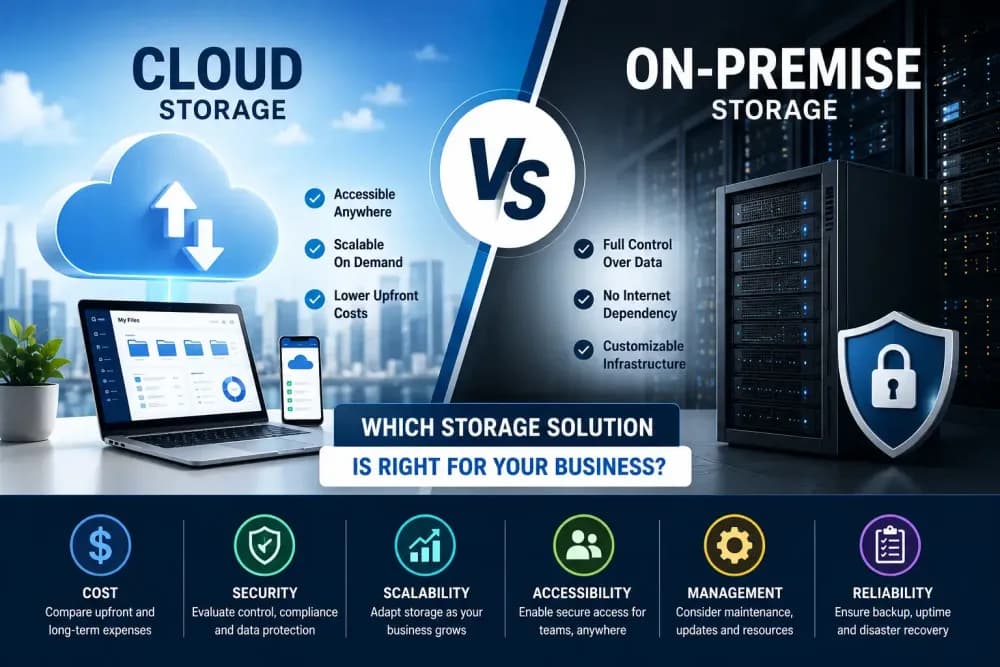
Choosing between cloud and on-premise storage is an important business decision. Cloud storage offers flexibility, scalability, and easier access. On-premise storage offers control, internal ownership, and direct infrastructure management. Each option has clear advantages depending on how your business operates.
The right solution should support your workflow, budget, growth plans, and security needs. Businesses that compare both options carefully can make a smarter long-term choice. In many cases, the best answer is not about following a trend. It is about choosing the storage model that truly fits your business.