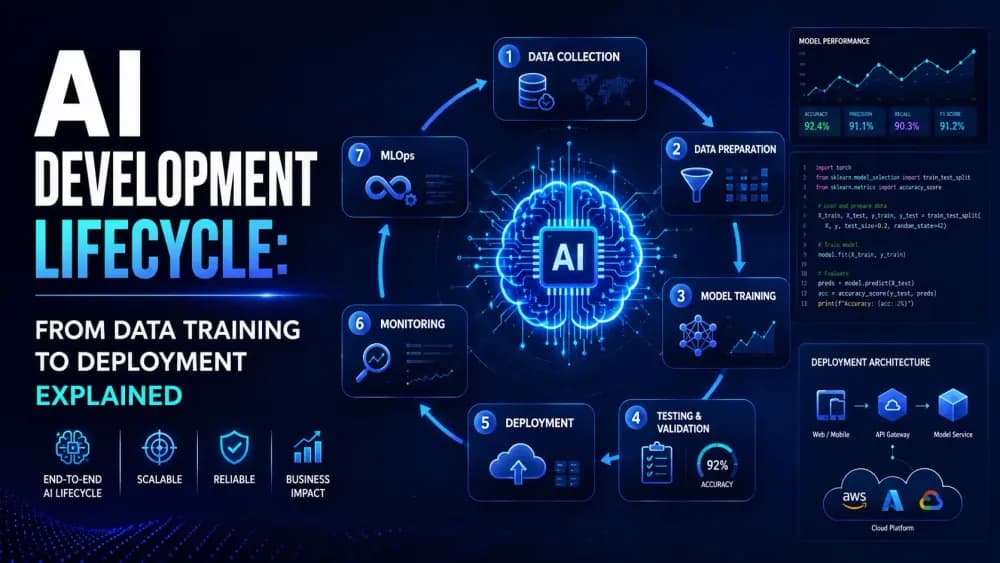
AI development does not begin and end with code. It follows a complete process. Teams first identify a business problem. Then, they collect data, train a model, test results, and deploy the solution. Each step affects the quality of the final product.
A strong lifecycle helps businesses avoid costly mistakes. It also makes AI easier to manage over time. Without a clear process, teams may create models that look good in testing but fail in real use. Therefore, planning matters from the very beginning.
Step One: Defining the Problem and Goals
Sustainability is no longer a side project. It has become a core business priority. Customers want responsible brands. Investors also expect companies to manage environmental risks. Therefore, IT leaders must rethink how they build and operate digital infrastructure.
This is where enterprise AI solutions and AI software development services can add real value. They help businesses improve energy use, reduce system waste, and make better infrastructure decisions. In short, greener operations can support both the planet and long-term business growth.
Start With a Real Business Challenge
AI should solve a real problem. It should not be built only because a business wants to follow a trend. Teams should first identify where delays, errors, or repetitive tasks are affecting performance. This creates a clear reason for using AI.
For example, a retailer may need better inventory planning. A bank may want to spot unusual transactions. A healthcare provider may need faster appointment scheduling. When teams understand the problem, they can build a solution that creates measurable value.
Set Goals That Teams Can Measure
Clear goals help teams stay focused. A company may want to reduce support response time. It may want to improve forecast accuracy. It may also want to lower manual processing costs. These goals give developers a clear direction.
Moreover, measurable outcomes make it easier to track progress. Teams can compare results before and after launch. They can also identify areas that need improvement. This creates a stronger connection between AI work and business growth.
Step Two: Collecting and Preparing Data
Quality Data Builds Stronger Models
AI systems learn from data. Therefore, the quality of the data matters greatly. Incomplete, outdated, or inaccurate data can lead to weak results. Teams should review data sources before model training begins.
They should also remove duplicate records and correct errors. Clear labels help the model understand patterns more accurately. In short, clean data gives an AI project a stronger foundation. It can also reduce future problems during testing and deployment.
Privacy and Security Must Be Part of Data Planning
Many AI projects use sensitive information. This may include customer details, financial records, health data, or internal business files. Teams must protect this information from the start. They should only collect the data they truly need.
In addition, businesses should control who can access data. Encryption, secure storage, and clear access rules can reduce risk. Responsible enterprise AI solutions help businesses use data carefully while maintaining privacy and trust.
Step Three: Training the AI Model
Models Learn From Patterns in Data
During training, an AI model studies the prepared data. It looks for patterns, relationships, and signals. The model then uses these patterns to make predictions or generate outputs. This is the stage where the system begins to learn.
For example, a fraud detection model can learn which transaction patterns look unusual. A recommendation system can learn which products customers often choose together. The better the data and training process, the better the model can perform.
Different Models Fit Different Problems
Not every business problem needs the same AI model. Some projects use machine learning for predictions. Others use natural language processing for text-based tasks. Generative AI can create content, summaries, and responses. The right choice depends on the business goal.
Developers should avoid using complex tools when simpler options can work. A practical model is often easier to manage and explain. With expert AI software development services, businesses can choose a model that fits their data, users, and long-term needs.
Step Four: Testing and Validating Performance
Testing Helps Teams Find Weaknesses Early
A trained model is not ready for launch without testing. Teams need to check its accuracy, speed, and reliability. They should test it with data that the model has not seen before. This shows whether it can work in real conditions.
Testing also helps teams find weak areas. The model may perform well for one group of users but poorly for another. It may also struggle with unusual inputs. Therefore, regular testing is essential before a system reaches customers or employees.
Fairness and Explainability Matter
AI systems should produce fair results. If training data includes bias, the model may repeat unfair patterns. This can affect decisions in hiring, finance, healthcare, and customer service. Teams should test for bias before deployment.
Explainability matters as well. Users and decision-makers should understand why the system produced a result. Clear explanations build trust. They also help teams identify problems faster. Responsible enterprise AI solutions include fairness checks and review processes throughout development.
Step Five: Deploying AI Into Real Workflows
Deployment Connects AI With Daily Operations
Deployment is the stage where an AI model moves into a real environment. It may connect with a website, a mobile app, a dashboard, or an internal business system. This is when users begin to interact with the solution.
However, deployment requires careful planning. Developers need to make sure the system can handle real traffic and real data. They also need to protect APIs, user access, and integrations. A smooth deployment helps teams avoid downtime and customer frustration.
User Experience Should Stay Simple
AI should make work easier, not more confusing. Users should not need technical knowledge to benefit from the system. Clear dashboards, simple prompts, and helpful guidance can improve adoption. The interface should support the user’s existing workflow.
For example, an AI support tool can suggest replies inside the customer service platform a team already uses. A sales team can view AI insights inside its existing dashboard. This makes the technology feel practical. It also encourages teams to use it consistently.
Step Six: Monitoring and Improving After Launch
AI Models Need Ongoing Attention
AI development does not end after deployment. User behavior can change. Data patterns can shift. Business needs can also evolve. This may affect how well a model performs. Therefore, teams should monitor results continuously.
Teams can track accuracy, user feedback, response time, and error rates. They can then update the model when performance drops. This ongoing process helps AI stay useful. It also protects the business from poor decisions and outdated results.
Monitoring Supports Long-Term Growth
Monitoring helps businesses understand how AI creates value. It can show how much time a tool saves. It can also reveal whether customer satisfaction improves. These insights help leaders decide where to invest next.
Reliable AI software development services can support monitoring, updates, and maintenance. They help businesses keep systems secure and scalable as demand grows. In addition, ongoing support makes it easier to introduce new features without disrupting existing operations.
FAQs
What is the AI development lifecycle?
The AI development lifecycle is the process of building, training, testing, deploying, monitoring, and improving an AI system. It helps teams create reliable and scalable solutions.
Why is data preparation important in AI development?
Data preparation improves the quality of AI training. Clean, accurate, and relevant data helps models produce stronger results and reduces the risk of errors.
What happens after an AI model is deployed?
After deployment, teams monitor the model’s performance. They review accuracy, user feedback, and changing data patterns. Then, they update the model when needed.
Why do businesses need AI software development services?
AI software development services help businesses build secure, tailored, and scalable AI solutions. They connect AI models with real data, existing systems, and long-term business goals.
What is MLOps?
MLOps is a set of practices that helps teams manage AI models more efficiently. It supports testing, deployment, monitoring, version control, and continuous improvement.
Conclusion
The AI development lifecycle turns an idea into a working solution. It begins with a real business problem. Then, it moves through data preparation, training, testing, deployment, and ongoing improvement. Each stage plays an important role in long-term success.
Businesses that invest in strong planning, quality data, and responsible monitoring can build AI systems that create real value. By using enterprise AI solutions and AI software development services, organizations can develop intelligent tools that are secure, scalable, and ready for real-world use.